Understanding User Roles & Permissions in MagicBrief
Last updated: February 20, 2026
Managing access correctly is critical to keeping your workspace secure and organized, especially as your team grows.
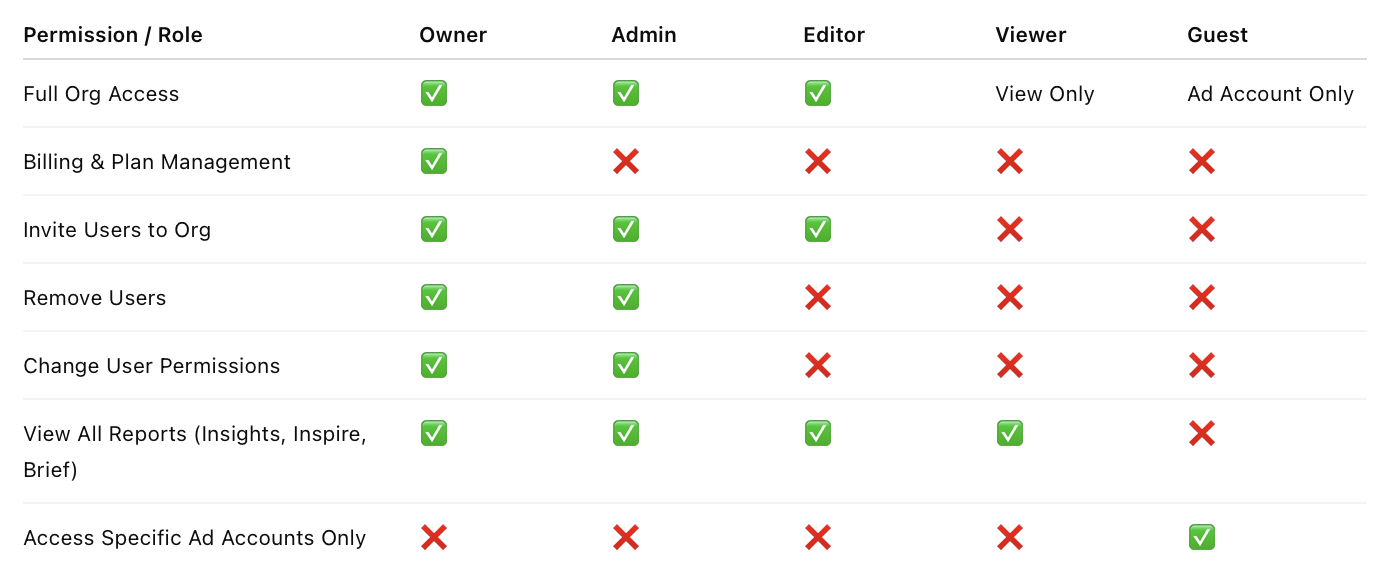
Below is a breakdown of each user role in MagicBrief and what level of access they have.
Owner
There is only one Owner per workspace.
The Owner has full control over:
• Billing
• Plan details
• Subscription changes
• User management
• All data and reporting access
If changes need to be made to billing, plan tier, or subscription status, the Owner must take action.
Admin
Admins have nearly all Owner-level controls, except billing.
Admins can:
• Invite users to the organization
• Remove users
• Change user roles and permissions
• Manage ad account access
• Access all reports and data
Admins cannot modify billing or subscription settings.
Editor
Editors have broad operational access but limited governance controls.
Editors can:
• View all reports in Insights, Inspire, and Brief
• Invite users to the organization
Editors cannot:
• Delete users
• Change user roles or permissions
• Modify billing
• Remove other users
Important: Editors can send workspace invites, so be mindful when granting this role.
Viewer
Viewers have read-only access.
They can:
• View reports in the Insights tab
• View content in the Inspire tab
• View content in the Brief tab
They cannot invite users or modify any permissions.
Guest
Guests have the most limited access.
Guests can:
• View reports only within the specific ad account(s) they are invited to
Guests cannot:
• Access the full organization
• View other ad accounts
• Invite additional users
• Modify permissions
This is the recommended role for external collaborators, partners, or clients who only need scoped access.
How to Change a Team Member’s Access Level
To update a user’s role:
Navigate to:
https://app.magicbrief.com/settings/teamLocate the team member.
Adjust their role as needed.
Save changes.
We recommend reviewing roles periodically to ensure users have the appropriate level of access for their responsibilities.